
This guide explains the SSMS workspace, which serves as your main control center when using the warehouse management system. The workspace provides quick access to all essential operations, tools, and transactions you need to manage inventory efficiently. Understanding how to navigate this central hub will help you perform daily warehouse tasks more effectively.
The workspace organizes all available functions into four main sections, each designed to streamline specific aspects of warehouse operations. Your access to different features depends on your assigned role and permissions, ensuring you see only the tools relevant to your responsibilities.
Workspace areas
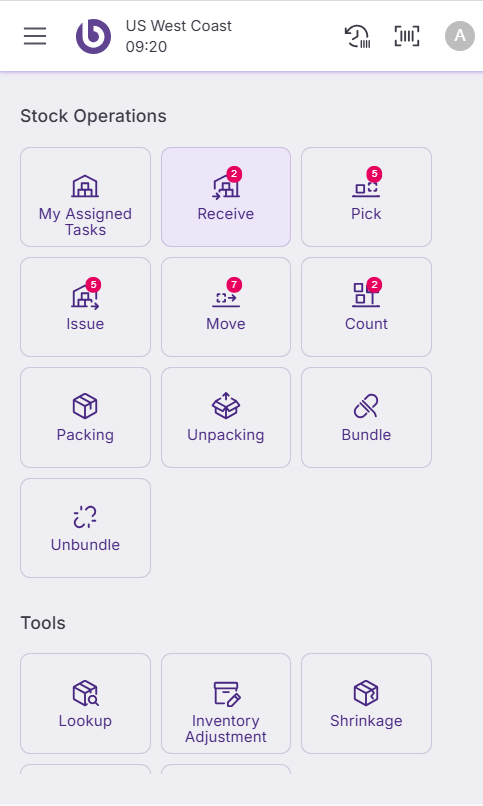
When you access SSMS, the main screen is called the 'Workspace'. This central hub displays all available tools and information organized in different sections.
The workspace includes several key areas:
-
Stock Operations showing different types of stock tasks, such as receiving or picking. Within that section, the option 'My assigned tasks' allows viewing your specific responsibilities.
-
Tools for quick stock checks by item or bin, reporting an incident, making a stock adjustment, managing shrinkages, or print documents.
-
Transactions where the user can create and manage documents like distribution orders, requisitions, inventory counts, and return directly in the SSMS device without the need to go to the backend.
-
Shortcuts. The application interface can be tailored to the specific needs and preferences of the warehouse team, enhancing their efficiency and user experience.
Action visibility and access control
Actions in the interface are role-dependent. By default, if a user does not have permission for a specific action, it will not appear in the interface.
This default behavior can be overridden by defining a custom UI configuration per warehouse, configured in the ‘Warehouse Definition’ window.
For information on how roles and permissions are set, see the Role and user action setup in SSMS section.
Stock operations
|
Action |
Trigger |
|---|---|
|
My Assigned Tasks |
SwitchToAssignedTasksWindow |
|
Receive |
SwitchToReceiveWindow |
|
Pick |
SwitchToPickWindow |
|
Issue |
SwitchToIssueWindow |
|
Move |
SwitchToMoveWindow |
|
Count |
SwitchToCountWindow |
|
Packing |
SwitchToBoxWindow |
|
Unpacking |
SwitchToUnboxWindow |
|
Bundle |
SwitchToBundleWindow |
|
Unbundle |
SwitchToUnbundleWindow |
Tools
|
Action |
Trigger |
|---|---|
|
Lookup |
OpenLookupDialog |
|
Inventory Adjustment |
OpenInventoryAdjustmentOptions |
|
Shrinkage |
OpenNewShrinkageDialog |
|
Incidence |
OpenNewIncidenceDialog |
Transactions
|
Action |
Trigger |
|---|---|
|
Distribution Order Issue |
SwitchToDistributionOrderIssueWindow |
|
Requisitions |
SwitchToRequisitionWindow |
|
Inventory Count |
SwitchToInventoryCountWindow |
|
Return |
SwitchToReturnWindow |
|
Blind Receive |
OpenNewBlindReceiveDialog |
Shortcuts
|
Action |
Trigger |
|---|---|
|
New Distribution Order (Assisted) |
OpenShortcutAssistedDistributionOrderDialog |
|
New Distribution Order (OTF) |
OpenShortcutOTFDistributionOrderDialog |